

SEƦVING THƦOUGH CODE || EVEƦY LINE AN OFFEƦING
What is Git?
Git is a distributed version control system that helps developers track changes in source code, collaborate efficiently, and manage project history. It was created by Linus Torvalds in 2005 and is widely used in software development today.
What Git Does Git allow you to:
Track changes to files over time.
Collaborate with others on the same codebase.
Revert to previous versions if needed.
Branch and experiment without affecting the main code.
This makes it ideal for managing software projects, especially when multiple developers are involved.
Why is Git Used?
Sharing Code with a Friend Using a Pen drive Imagine you and your friend are working on the same coding project, but instead of Git, you’re just using a pen drive:
Boring life Without Git (just pen drive) :
You write some code and copy it to the pen drive. You give the pen drive to your friend. Your friend edits the files and saves them back. Now you have no idea what changed unless you manually compare files. If both of you edit the same file, one person’s changes might overwrite the other’s messy and confusing.
Mentos Life With Git (pen drive analogy) :
The pen drive now has a magic notebook inside that records every change (commits).When you add code, Git writes down: “XYZ added a new function at 3:00 PM.” When your friend edits code, Git notes: “Friend fixed a bug at 4:00 PM.” Both of you can plug the pen drive into your laptops, make changes, and Git keeps track of who did what, when, and why. If you both edit the same file, Git doesn’t just overwrite it shows the differences and helps you merge them. You can even create branches: like having separate folders inside the pen drive where you experiment, then later merge them back into the main folder.
Why This Analogy Works
• Pen drive = Local Git Repository → All history and files are stored locally.
• Friend = Collaborator → They also have a copy of the pen drive (Git repo).
• Magic Notebook = Git Commit History → Every change is logged.
• Branching = Separate Folders → Safe experiments without disturbing the main work.
• Merging = Combining Folders → Bringing changes back together smoothly.
So, Git is like upgrading your pen drive with superpowers: it doesn’t just store files, it remembers every version, helps you avoid overwriting, and makes collaboration with friends smooth and safe.
Git Basics and Core Terminologies:
Here are the some basic and core terminologies uses in Git
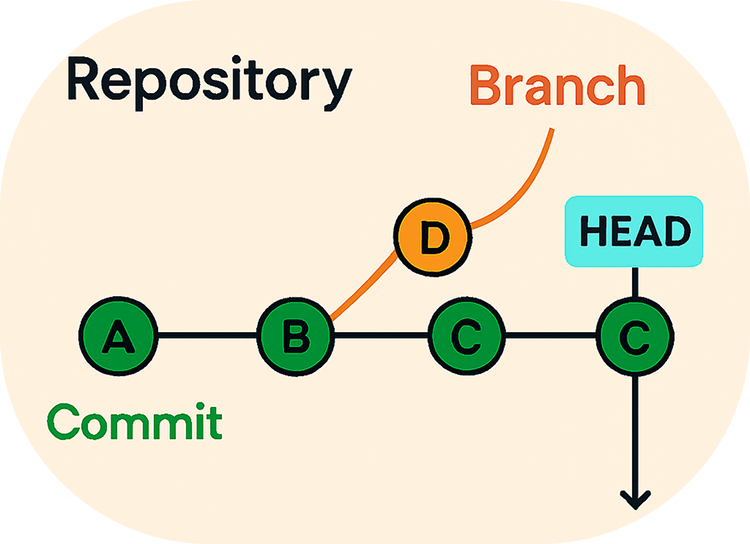
Repository : A repository is like a project folder managed by Git. It holds all your project files such as code, documentation, and assets along with a hidden .git directory that stores the complete history and metadata of every change.
Branch : A branch is a parallel timeline of your project. Git starts with a default branch called main (or master in older setups), but you can create new branches to experiment with features, fix bugs, or work independently.
Commit : A commit is a snapshot of your project at a specific moment. It records what changed, who made the change, and includes a message describing the update.
HEAD : HEAD is a pointer that tells Git where you currently are in the project history. It usually points to the latest commit in your current branch, but it moves whenever you switch branches or checkout a specific commit.
Common Git Commands:
Here's the table format for step by step git commands that we use commonly:
| Step | Command | Purpose | Example |
| 1.Initialize | git init | Create a new Git repository in your project folder. | git init |
| 2.Stage changes | git add <file> | Add files to the staging area before committing. | git add index.js |
| 3.Check status | git status | Show which files are staged, unstaged, or untracked. | git status |
| 4.Review changes | git diff | Compare changes in your working directory with the staging area. | git diff |
| 5.Commit history | git log | View the history of commits in the repository. | git log |
| 6.Inspect commit | git cat -file -p <hash> | Display details of a specific commit object. | git cat -file -p a8 |
| 7.Undo changes | git revert <hash> | Create a new commit that undoes the changes of a previous commit. | git revert a1b2 |
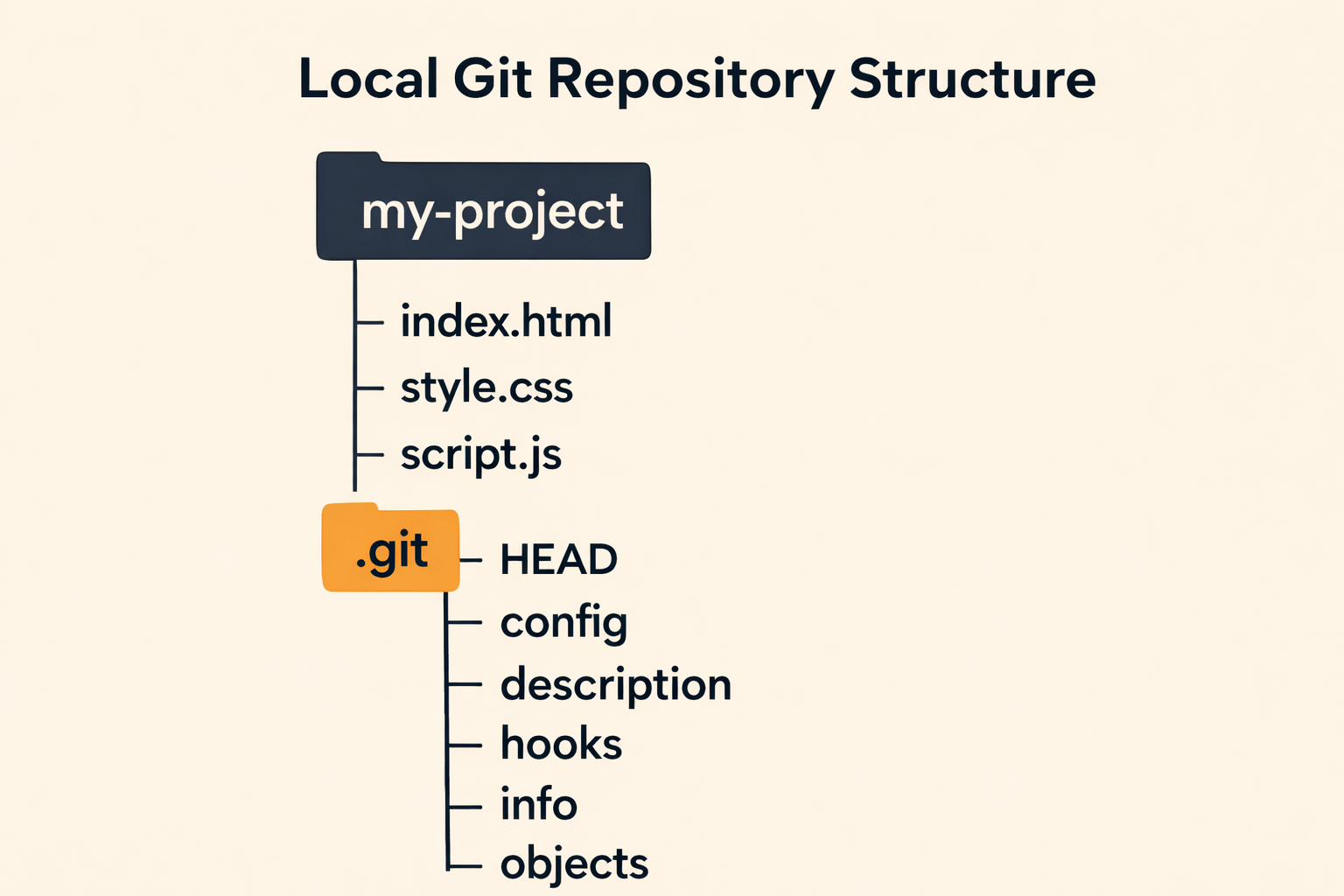
Structure of a Local Git Repository
When you run git init inside a project folder, Git creates a hidden directory called .git . This is where Git stores all the information it needs to track your project’s history.
Conclusion:
Git makes teamwork simple, experiments safe, and progress traceable — the perfect companion for every beginner.
Want More…?
I post Blog and related content on the following platforms:


